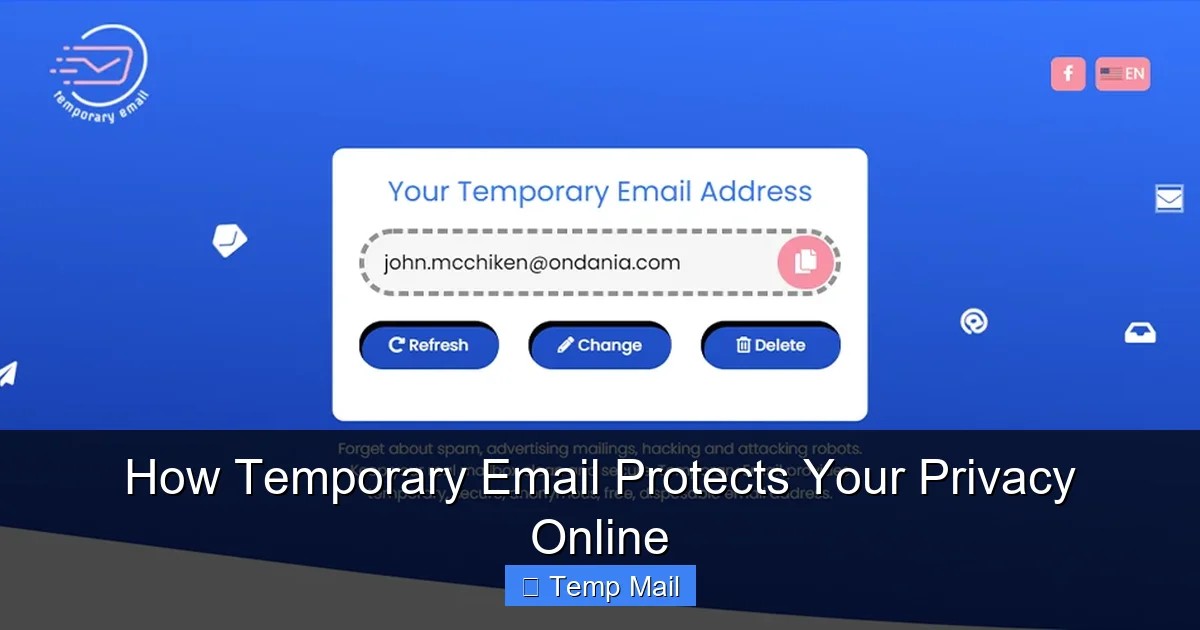
Your primary email address is a digital fingerprint, constantly tracked and sold. Temporary email services provide disposable, anonymous inboxes that act as a protective shield. By using a throwaway address for online sign-ups, you prevent spam, minimize data exposure in breaches, and reclaim control over your personal information. It’s a simple, powerful tool for anyone wanting to browse and register online without sacrificing privacy.
Think about your primary email address. It’s likely the key to your social media, your online bank, your shopping accounts, and maybe even your work communications. It’s a master key to your digital life. Now, think about the last time you wanted to download a free PDF, access a forum, or get a discount code from a website you didn’t fully trust. What did you do? You probably typed in that same, precious, permanent email address. Every time you do that, you hand over a piece of your digital identity. That address is tracked, sold to data brokers, and becomes a target for spam and potential data breaches. But what if you had a way to say “no” to that exchange? What if you could get the resource you need without giving away your real contact information? Enter the world of temporary email—a simple, powerful tool designed specifically to protect your privacy online.
This isn’t about hiding something; it’s about being smart. Your email address is one of the most valuable pieces of personal data online. It’s used to identify you across platforms, target you with ads, and, unfortunately, becoming a liability when companies you’ve shared it with suffer a security breach. Temporary email services offer a practical solution: a disposable, anonymous inbox that exists for a short time, serves its single purpose, and then vanishes. In this guide, we’ll dive deep into exactly how this technology works, the tangible privacy benefits it provides, and how you can seamlessly integrate it into your daily digital routine to build a stronger, more private online presence.
Key Takeaways
- Spam & Marketing Prevention: A temporary email intercepts promotional emails and newsletters, keeping your primary inbox clean and clutter-free.
- Data Breach Mitigation: If a website using your temp mail is hacked, your real identity and permanent contacts remain safe and uncompromised.
- Enhanced Anonymity: These services require no personal details, creating a barrier between your online activities and your true identity.
- Reduces Digital Footprint: Using temp mail for low-stakes accounts limits the number of services that directly link to your main email address.
- Guards Against Tracking: It prevents companies from easily building a comprehensive profile based on your primary email address across multiple sites.
- Simple & Instant: No registration is needed; a new, private inbox is generated in seconds for immediate use.
- Not for Critical Accounts: Temp mail is ideal for one-time sign-ups but should never be used for banking, primary social media, or essential services.
📑 Table of Contents
- The Problem: Your Permanent Email is a Privacy Liability
- How Temporary Email Works: The Mechanics of Disposable Inboxes
- Core Privacy Benefits: Your Invisible Shield
- Practical Use Cases: When to Reach for a Temporary Email
- Important Limitations and Cautions: What Temporary Email Is NOT For
- Choosing a Temporary Email Service: What to Look For
- Empowering Your Digital Life, One Disposable Address at a Time
The Problem: Your Permanent Email is a Privacy Liability
Before we explore the solution, we must fully understand the scale of the problem. Your primary email address is far more than a communication tool; it’s a unique identifier that ties your entire digital self together. Let’s break down why handing it out casually is a risk.
It’s a Beacon for Spam and Targeted Ads
When you sign up for a free webinar or a store’s newsletter using your main email, you’re often added to their marketing list. But that’s rarely the end of it. Many companies sell or share their email lists with “partner” networks. Your single sign-up can trigger a cascade of promotional emails from dozens of unrelated companies you’ve never heard of. Your inbox, meant for important personal and professional messages, becomes a dumping ground for advertisements. This is not just annoying; it’s a constant distraction and a subtle form of data exploitation where your attention is the product being sold.
The Data Brokerage Ecosystem
Data brokers are companies that collect personal information—including your email address, name, location, and browsing habits—and compile it into detailed profiles. These profiles are then sold to advertisers, insurers, employers, and others. Your email address is often the anchor point that links all this disparate data together. The more services you use with your primary email, the richer and more accurate your profile becomes. This happens often without your explicit, informed consent. By limiting the number of services that have your real email, you directly starve data brokers of a key linking identifier, making your digital profile less valuable and less complete.
The Domino Effect of Data Breaches
This is the most serious threat. Major data breaches are weekly news. When a company you have an account with gets hacked, the stolen data almost always includes user email addresses. Hackers then use these vast databases for phishing attacks (sending fake emails that look legitimate to trick you into giving passwords or credit card info), credential stuffing (trying common passwords on other sites), or simply selling the list on the dark web. If you used your primary email for a low-security forum that got breached, that email address is now in the hands of malicious actors, making your more important accounts (like your email or bank) bigger targets. A temporary email creates a buffer zone; if the forum is breached, the attacker only gets a disposable address that leads nowhere.
How Temporary Email Works: The Mechanics of Disposable Inboxes
Understanding the simplicity of temporary email services helps demystify why they are so effective. There’s no complex setup or hidden catch. It’s a straightforward process designed for instant, anonymous access.
Visual guide about How Temporary Email Protects Your Privacy Online
Image source: anonymmail.net
Generation and Assignment
You visit a temporary email provider’s website (like Temp-Mail, 10MinuteMail, or similar services). The moment the page loads, the system automatically generates a unique, random email address for you. This address is tied to a temporary inbox stored on the provider’s server. You don’t create an account; you don’t set a password. The address and its associated inbox are created simultaneously and are ready to use immediately.
The Lifespan and Auto-Deletion
These inboxes are designed to be ephemeral. The lifespan varies by service—some last 10 minutes, others 1 hour, and some up to 24 hours or until you close the browser tab. A countdown timer is usually displayed prominently. During this period, any emails sent to your temporary address are captured by the service’s server and displayed in a simple web-based inbox interface. Once the timer expires, the inbox and all its contents are permanently and automatically deleted from the server. There is no recovery. This forced expiration is a core privacy feature, ensuring no lingering data.
Receiving and Accessing Emails
You use the generated temporary address to sign up for a website or service. When that site sends a verification email or a download link, it is routed to the temporary email provider’s server. You simply refresh the temporary inbox page on your browser to see the new email arrive. You can then click links, copy codes, or view content directly from that web interface. There is no need to forward emails to your main account (which would defeat the purpose), though some advanced services offer that as an optional, secure feature for a limited time.
Core Privacy Benefits: Your Invisible Shield
Now let’s connect the mechanics to the tangible privacy advantages. Using a temporary email isn’t just about avoiding clutter; it’s an active privacy-preserving strategy.
Visual guide about How Temporary Email Protects Your Privacy Online
Image source: gadgetsin.com
1. Complete Spam Interception
The most immediate and noticeable benefit. Any marketing emails, newsletters, or promotional blasts are sent to the temporary address, which expires and takes all that junk with it. Your primary inbox remains a sanctuary for emails from friends, family, and critical services. This drastically reduces the “noise” and the psychological burden of managing a flooded inbox.
2. Breach Containment and Identity Protection
Imagine you use a temp mail to sign up for a niche gaming forum. Six months later, that forum suffers a massive breach. The hackers get a database full of usernames and… a bunch of defunct temporary email addresses. They have nothing to link back to your real identity. Your primary email, your name, your other accounts—all remain insulated. You’ve effectively contained the breach to a disposable, meaningless identifier. This is arguably the most powerful security benefit of using temp mail for non-essential accounts.
3. True Anonymity for Low-Stakes Actions
Many online activities don’t require you to identify yourself. Reading a public blog that asks for an email to comment, downloading a public whitepaper, accessing a free trial of a SaaS tool you’re just testing. A temporary email allows you to participate in these activities without handing over a piece of your permanent identity. It lets you explore the web, test services, and consume content anonymously, which is a fundamental privacy right.
4. Thwarting Cross-Site Tracking and Profiling
Ad networks and analytics companies use email addresses as a stable “key” to track your behavior across different websites. If you use the same email on Site A, Site B, and Site C, they can build a super-profile of your interests and habits. By using a different temporary email for each new site or service, you break this linkage. Each site sees a completely different “person,” making it impossible for them to merge your activity into a single profile. You become a collection of anonymous, unconnected users.
5. Minimizing Your Digital Footprint
Every account you create is a data point that exists in cyberspace. Reducing the number of accounts tied to your primary email is like reducing your digital shadow. It means fewer companies have a direct line to your main communication channel and fewer passwords (even if you use a password manager) that are ultimately linked to your core identity. A minimalist digital footprint is a more secure and private one.
Practical Use Cases: When to Reach for a Temporary Email
Knowing the theory is one thing; knowing when to apply it is another. Here are concrete, everyday scenarios where a temporary email is the smart, private choice.
Visual guide about How Temporary Email Protects Your Privacy Online
Image source: gadgetsin.com
Downloading Gated Content
This is the #1 use case. An ebook, a research report, a template, or a software trial that requires an email address to download. You want the content, but you don’t want to be added to a marketing list for the next five years. Use a temporary email, get the download link, and walk away. The company gets a “lead,” and you get your content with zero long-term commitment or spam risk.
Signing Up for One-Time Access or Trials
Need to create an account on a forum just to read one thread? Want to test a new app for 10 minutes? These are perfect for temp mail. The service gets a user count, and you get access without creating a permanent record. Just remember to note down any important login details if the service requires them beyond the initial session, though this is rare for temp-mail-friendly sites.
Accessing Public Wi-Fi or Services
Some public Wi-Fi networks (in cafes, airports, hotels) require you to “register” with an email address to get the password. Using your primary email here exposes it to the network provider’s data practices and potential spam. A temporary email is the ideal, no-strings-attached solution for this common situation.
Bypassing Regional Restrictions or Surveys
Some websites block content based on geography and ask for an email to “unlock” it. Others use lengthy surveys as a gatekeeper. A temp mail allows you to circumvent these barriers quickly and privately when the content is worth it, but the barrier is not.
Testing Website or App Registrations
If you’re a developer or a QA tester, you need to test user registration flows. Using a suite of temporary emails allows you to automate or manually test sign-up, verification, and welcome email processes without polluting your real inbox or creating dozens of permanent test accounts.
Protecting Your Identity on Marketplaces
Selling something on a peer-to-peer marketplace like Craigslist or Facebook Marketplace? Often, initial buyer or seller inquiries come through an anonymized email relay. If you need to provide a direct email for a serious inquiry, using a temporary one for the first few exchanges protects your main address until you’re sure the other party is legitimate.
Important Limitations and Cautions: What Temporary Email Is NOT For
While powerful, temporary email is not a universal solution. Understanding its limitations is crucial for using it safely and effectively.
It’s Not for Important, Long-Term Accounts
Never, ever use a temporary email for your primary email account password recovery, your bank, your main social media profiles (Facebook, Twitter/X, Instagram), your cloud storage (Google Drive, iCloud), or your work/school accounts. If the inbox expires, you will be permanently locked out of these essential services, often with no way to recover them. These accounts require a stable, permanent, and secure email address you control indefinitely.
No Sending Capability (Usually)
Most free temporary email services are receive-only. You can get emails sent *to* the address, but you cannot *send* emails *from* it. This is by design to prevent abuse for spam. If you need to send an email anonymously, you would need a different, more specialized secure email service, not a standard temp mail provider.
Potential Blocking by Some Services
Many reputable websites and platforms are wise to the use of disposable email domains. They actively maintain and block lists of known temporary email providers to prevent fraud, spam, and abuse. If you try to sign up with a temp mail on a site like Netflix, PayPal, or most major social networks, the registration will be rejected outright. This is a good thing—it tells you that for that service, a real, committed identity is required.
Security and Provider Trust
You are trusting the temporary email provider not to log your IP address or the content of received emails. While reputable providers delete data quickly, a malicious provider could theoretically log everything. For highly sensitive activities (like whistleblowing), a more robust, encrypted anonymous email service like ProtonMail (which offers a permanent, encrypted address) is a better choice. Use temp mail for routine privacy, not for high-stakes anonymity.
Two-Factor Authentication (2FA) Woes
If a service sends 2FA codes (like for login verification) to your email, and that email is a temporary one that expires before you need it, you will be locked out. Always use your primary, secure email for any account that offers or requires 2FA.
Choosing a Temporary Email Service: What to Look For
Not all temporary email services are created equal. While the core function is similar, some features and practices distinguish a good, reliable service from a potentially problematic one.
Automatic Deletion and Clear Lifespan
The service must explicitly state the inbox lifetime (e.g., 10 minutes, 1 hour, 24 hours) and, most importantly, must automatically and permanently delete all emails and the address after that time. Avoid services that claim to be “temporary” but keep data for days or require manual deletion.
No Registration or Personal Data Required
The entire point is anonymity. A service that asks for a CAPTCHA is fine (to prevent bots), but one that asks for your own email, phone number, or forces account creation defeats the purpose. The ideal service: visit site > get address > use it > forget it.
HTTPS Encryption
Ensure the website uses HTTPS (look for the padlock icon in your browser). This encrypts the connection between your browser and the service’s server, preventing eavesdroppers on your local network (like in a cafe) from seeing the emails you are viewing.
Domain Variety and Auto-Refresh
Some services offer multiple domain options (e.g., @tempmail.com, @10minutemail.com). This is useful if one domain gets blocked by a particular website. An auto-refresh feature for the inbox is also convenient, so you don’t have to manually reload to see new emails arrive.
Reputation and Transparency
Do a quick search for reviews or forum discussions about the service. A provider that has been around for a while and is recommended in privacy-focused communities (like Reddit’s r/privacy) is generally a safer bet than an obscure, newly launched site. Look for a clear privacy policy that states they do not share or sell your data.
Optional Secure Features
Some premium or advanced temp mail services offer features like password-protected inboxes (if you need to access it from a different device), the ability to extend the inbox lifespan, or secure forwarding to your main email for a limited time. These can be useful for more complex scenarios but aren’t necessary for basic, single-use needs.
Empowering Your Digital Life, One Disposable Address at a Time
Protecting your online privacy can feel like an overwhelming, technical battle against massive data-hungry corporations. But often, the most effective strategies are brilliantly simple. Temporary email is precisely that: a brilliantly simple tool that puts power back in your hands. It’s the digital equivalent of using a throwaway glove to handle something dirty—you complete the task, you get what you need, and then you discard the glove without contaminating your own hands.
By consciously choosing to use a temporary email for the vast majority of online sign-ups that don’t merit your primary identity, you perform a powerful act of data hygiene. You stop the relentless accumulation of your email address across thousands of databases. You insulate your critical accounts from the ripple effects of inevitable data breaches. You reclaim your inbox as a space for genuine communication, not a billboard for targeted advertising. Most importantly, you shift from being a passive subject of data collection to an active manager of your digital footprint.
Start today. Bookmark one or two reputable temporary email providers. The next time a website asks for your email to access a free guide or a trial, pause. Ask yourself: “Is this worth linking to my permanent identity?” If the answer is no, generate a disposable address. It takes five seconds. That small habit, multiplied over hundreds of sign-ups over the years, will have a profound impact on your privacy, security, and peace of mind. Your primary email address is a key to your life. Guard it fiercely. Use the disposable one for everything else.
Frequently Asked Questions
Is using a temporary email legal?
Yes, using temporary email services is completely legal. They are legitimate tools provided by companies for privacy and convenience. The legality only becomes an issue if the service is used for fraudulent activities, sending spam, or other illegal purposes, which violates the provider’s terms of service and the law.
Can temporary emails be traced back to me?
Generally, no. Reputable temporary email services do not require any personal information and do not keep logs linking the temporary address to your IP address after the inbox expires. However, your IP address is visible to the service during your session. For highly sensitive anonymity, combining a temp email with a VPN would add an extra layer of protection by masking your IP from the temp mail provider itself.
What happens if I need to reset a password for an account I signed up with a temporary email?
You will not be able to. This is the critical limitation. Any account that requires password recovery, important notifications, or two-factor authentication via email must be registered with a permanent, accessible email address that you control long-term. Always use your primary email for any account you need to keep and access reliably in the future.
Are temporary email services secure?
Security varies. Most focus on privacy through disposability rather than high-grade encryption for the inbox content. Look for services that use HTTPS to protect the connection. For maximum security of the email content itself, a service like ProtonMail (which offers encrypted, permanent accounts) is a better choice for sensitive communications. Temp mail is secure against long-term data harvesting and breach linkage but may not be secure against a malicious provider intercepting content in real-time.
Why do some websites block temporary email addresses?
Websites block disposable email domains to combat fraud, spam, and abuse. These platforms want genuine users who are committed to the service (like social networks, banks, or subscription services). Blocking temp mail helps them reduce fake account creation, limit spam registrations, and ensure users can be contacted reliably. If a site blocks your temp mail, it’s a sign that service likely requires a real, long-term identity.
Can I extend the life of a temporary email inbox?
Some services offer a “keep alive” or “extend” button that adds more time (e.g., another 10 minutes) to the inbox timer. This is useful if you’re waiting for a delayed verification email. However, this is not universal, and the total lifespan is always finite. Do not rely on being able to extend it indefinitely; treat every temporary inbox as having a short, fixed expiration.
Leave a Reply