Your primary email address is a magnet for spam, data harvesting, and unwanted marketing. A temporary email service provides a disposable, anonymous address you can use for sign-ups, downloads, and any online interaction where you don’t fully trust the recipient. By using a temp mail for these low-stakes activities, you create a critical barrier, ensuring your real inbox remains private, organized, and secure. It’s a simple, free, and highly effective tool for taking back control of your digital footprint.
Think about your primary email address for a second. It’s probably tied to your bank accounts, your family, your work, and your most important online identities. It’s a digital key to your life. Now, think about the last time you simply wanted to download a free PDF guide, read an article, or sign up for a one-time discount. Did you hesitate, knowing you were about to hand over that precious key to a website you barely trust? That hesitation is the problem. The solution? A brilliant, simple tool called temporary email, or “temp mail.” This article will completely unpack how temp email helps avoid spam and fundamentally changes your approach to online privacy.
Spam isn’t just annoying; it’s a constant drain on your time and a vector for scams. Every time you use your real email for a sketchy sign-up, you’re adding fuel to the spam fire. Temporary email services provide a clean, disposable alternative. They give you a random inbox that lives for a short, defined period—often just 10 minutes to an hour. You use it, you get what you need, and then it vanishes into the digital ether, taking all the associated spam with it. It’s like using a burner phone for a single call, but for your email. Let’s dive deep into how this works and why you should start using it today.
Key Takeaways
- Primary Inbox Protection: Temp email acts as a sacrificial layer, absorbing spam and promotional emails meant for your primary address.
- Enhanced Privacy: It prevents websites and services from linking your online activity to your real identity and personal email.
- No Long-Term Commitment: These addresses self-destruct after a short period (often 10 minutes to 1 hour), eliminating long-term clutter.
- Simple & Accessible: No registration, no password, and no personal details are required to generate a temporary inbox instantly.
- Ideal for Testing & Verification: Perfect for one-time account verifications, downloading gated content, or testing website sign-up flows.
- Not for Critical Accounts: Should never be used for banking, primary social media, or any service requiring ongoing access and password recovery.
- Risk Mitigation: Significantly reduces the risk of your primary email being involved in a data breach or sold on the dark web.
📑 Table of Contents
- The Spam Problem: Why Your Inbox is a Target
- What is Temporary Email? A Digital Disposable Shield
- The Direct Link: How Temp Email Stops Spam in Its Tracks
- Practical Scenarios: When and How to Use Temp Mail
- Limitations and Crucial Best Practices
- The Bigger Picture: Temp Mail and Digital Privacy Hygiene
- Conclusion: Take Control, One Disposable Inbox at a Time
The Spam Problem: Why Your Inbox is a Target
To understand the solution, we must first stare directly at the problem. Spam emails are the digital equivalent of junk mail stuffed into your physical mailbox, but far more pervasive and potentially dangerous. They arrive because your email address has been harvested, sold, or leaked. But how does it get harvested in the first place? Often, it’s through our own actions.
Every Click and Sign-Up is a Risk
Consider the modern web experience. You’re reading a great blog post, and a pop-up offers a “free checklist” if you enter your email. You see a “limited-time offer” for a discount. You want to comment on a forum. Each of these interactions typically requires an email address. Many of these sites, especially smaller blogs, niche forums, or one-off e-commerce stores, have weak data security. Their email lists are often poorly protected. When they get hacked (and they often do), your email is exposed. Worse, many of these sites have pre-checked boxes consenting to share your data with “partners.” That’s how your address gets sold to the highest bidder in the murky world of data brokers.
The Domino Effect of a Single Leak
Once your primary email is out there, it’s nearly impossible to contain. Spammers use automated bots to scan websites, social media profiles, and data breaches for email patterns. A single leak can trigger a cascade. You might start getting offers for pharmaceuticals you never searched for, phishing emails pretending to be your bank, or “ Nigerian prince” scams. The volume increases, and the sophistication of the scams often follows. Your inbox, once a place of productivity and personal communication, becomes a minefield. The time spent deleting spam and the anxiety of spotting a real phishing attempt among the clutter is a real cost.
What is Temporary Email? A Digital Disposable Shield
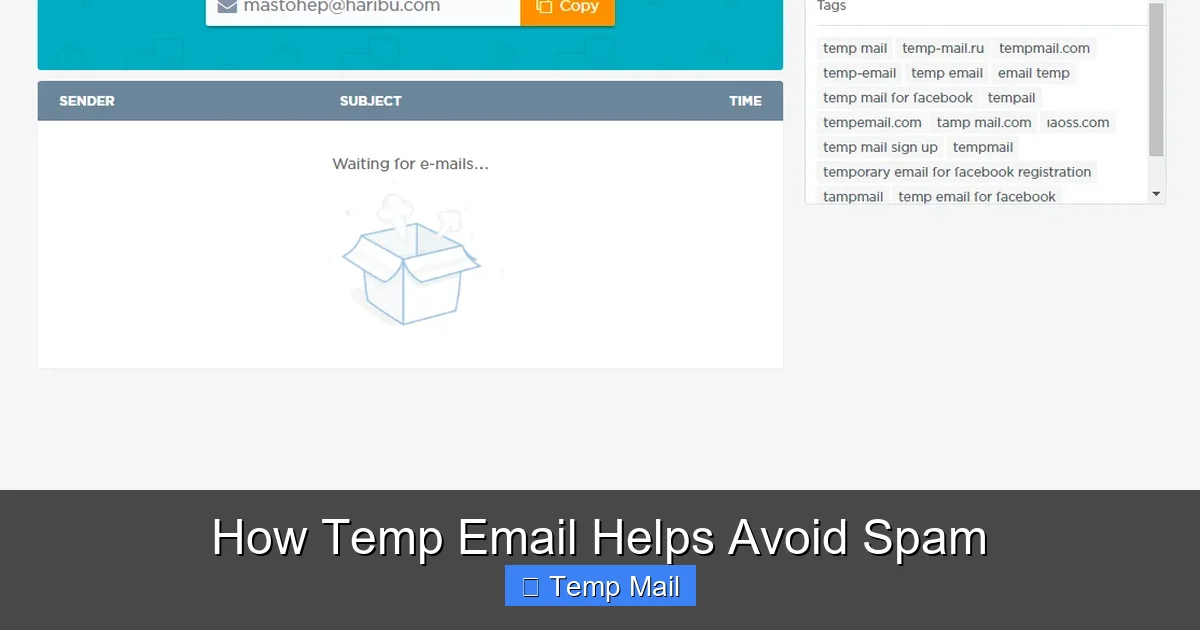
Temporary email services are web-based platforms that generate a random, unique email address for you on the spot. This address is completely anonymous and not linked to your identity. You can visit a site like Temp-Mail.org, Guerrilla Mail, or 10MinuteMail, and instantly see an inbox address like “[email protected].” You then use that address wherever you need a placeholder.
Visual guide about How Temp Email Helps Avoid Spam
Image source: gridinsoft.com
How It Works: The Mechanics of Anonymity
The process is beautifully simple, designed for maximum convenience and zero friction:
- Generation: You visit a temp mail website. The server instantly creates a new, random email address and displays it to you, along with a pre-loaded inbox interface.
- Usage: You copy that address and paste it into any online form that requests an email. You might use it to get a download link, verify an account for a trial, or access a gated article.
- Reception: Any email sent to that disposable address is routed to the temp mail service’s servers and appears in the web-based inbox they provided you.
- Access: You refresh the inbox page to see if the verification email or download link has arrived. You click the link or copy the code.
- Disposal: After a predetermined time (the timer is usually visible), the email address and all its messages are permanently deleted from the server. The address is then recycled and given to a future user.
There is no sign-up, no password, and no personal information required from you. The anonymity is inherent in the system’s design.
Key Features That Make It Effective
What separates a good temp mail service from a mediocre one? Look for these features:
- Auto-Refresh Inbox: The inbox automatically checks for new messages, so you don’t have to manually reload.
- Replies Capability: Some advanced services allow you to reply from the temp address, useful for brief, one-off communications.
- Domain Variety: Services offering multiple domain options (e.g., @tempmail.com, @guerrillamail.com) can help if a site blocks a known temp mail domain.
- No Captcha or Friction: The best services don’t make you solve puzzles to view your inbox.
- Clear Countdown Timer: A visible timer shows exactly how long you have left before the address expires.
The Direct Link: How Temp Email Stops Spam in Its Tracks
Now, let’s connect the dots. How does using a disposable address directly translate to less spam? It’s about breaking the chain of association between your online activity and your permanent identity.
Visual guide about How Temp Email Helps Avoid Spam
Image source: tempail.com
1. It Creates a Firewall for Your Primary Address
This is the most immediate and tangible benefit. When you use your real email to sign up for a free webinar from a company you’re casually interested in, you’re allowing that company to add you to its marketing list. Even if they have a “unsubscribe” link (which they legally must), that’s just one list. Your email might be shared with subsidiaries, advertisers, or sold. By using a temp address, that promotional stream is directed to an inbox that will self-destruct in 60 minutes. You get the webinar link, you attend, and the marketing emails have nowhere to go. The spam never reaches your primary inbox because your primary address was never given.
2. It Severs the Data Broker Chain
Data brokers are companies that collect personal information, including email addresses, and compile it into profiles to sell to advertisers, insurers, and other entities. They are a primary source of spam. When you use your real email on a website with a weak privacy policy, you are implicitly consenting (often via obscure terms) to that data being aggregated and sold. A temporary email is a dead end for data brokers. The address is transient, not tied to a real person, and becomes useless within an hour. It pollutes the data stream with garbage information, making the profiles they build less accurate and less valuable, while protecting your real contact details.
3. It Prevents Credential Stuffing Attacks
Here’s a more technical but crucial point. When a website you use (say, a small online forum) suffers a data breach, hackers steal usernames, passwords, and email addresses. They then use these stolen credentials to try and log into *other* popular services like your email, social media, or bank—a tactic called “credential stuffing.” If you used your primary email address for that breached forum, your email is now in the hands of criminals, making you a target for sophisticated phishing and account takeover attempts. By using a unique temp email for that forum, even if it gets breached, the stolen credential is useless for attacking your *real* accounts because it points to an inbox that no longer exists.
Practical Scenarios: When and How to Use Temp Mail
Knowing the theory is one thing; knowing when to apply it is what makes the tool powerful. Here are concrete, everyday situations where temp email is your best friend.
Visual guide about How Temp Email Helps Avoid Spam
Image source: supertechman.com.au
Scenario 1: Downloading Gated Content
You find an excellent e-book or research paper that requires an email address. You want the content, but you don’t want to join the author’s newsletter (or you’re not sure about their email practices). Use a temp address. Get the download link, save the file, and walk away. The subsequent “value-packed” newsletter series goes to an inbox that vanishes.
Scenario 2: Signing Up for Trials or Freemium Services
You want to try a new SaaS tool, app, or streaming service for a 7-day trial. The catch? They need an email. If you use your primary, you’ll get bombarded with “your trial is ending!” and “upgrade now!” emails for months, even if you unsubscribe. Use a temp address for the trial verification. Enjoy the trial. When the trial ends, the service has no way to email you because the address is gone. You’ve avoided a long-term marketing funnel.
Scenario 3: Accessing Public Wi-Fi or Forums
Many coffee shops, airports, or hotel Wi-Fi networks require you to “register” with an email to get the password. Is the network operator trustworthy? Probably, but why take the risk? Use a temp address. Similarly, if you’re making a single, anonymous post on a public forum or comment section that forces email verification, a temp mail is perfect.
Scenario 4: Testing Website Forms and Development
If you’re a developer, marketer, or QA tester, you often need to test email sign-up flows, password reset functions, or notification systems. Using your real email for this floods your inbox with test messages. Creating a dedicated temp address for testing purposes keeps your professional and personal communications clean.
Scenario 5: Avoiding “Email for Discount” Traps
Retail websites are famous for offering a 10% discount in exchange for your email. This is a high-value transaction for them—they’re buying your contact info. Use the temp mail, get the discount code, complete your purchase. The relentless stream of promotional emails about “new arrivals” and “flash sales” is directed to the disposable void.
Limitations and Crucial Best Practices
Temp email is a powerful tool, but it’s not a magic shield for everything. Using it incorrectly can backfire. Understanding its limitations is key to using it safely and effectively.
What Temp Mail CANNOT Do
- Secure Sensitive Communications: Never use it for banking, medical records, legal documents, or any communication requiring confidentiality and a verifiable sender/receiver chain. The emails are not encrypted end-to-end and are accessible by the service provider during their brief lifetime.
- Recover Lost Accounts: If you use a temp email to sign up for an important service (like a social media account or cloud storage) and then forget your password, you are locked out forever. The recovery email will not exist.
- Build Long-Term Relationships: You cannot use it for newsletters you genuinely want to receive, professional networking, or any ongoing correspondence. Its nature is ephemeral.
- Guarantee 100% Delivery: Some websites actively block known disposable email domains. If this happens, you’ll need to try a different temp mail service or use a different approach (like a dedicated secondary email).
Golden Rules for Safe Usage
Follow these guidelines to maximize benefit and avoid pitfalls:
Rule 1: The Hierarchy of Emails. Adopt a three-tier system: 1) Your Primary Email (for family, close friends, banking, critical accounts). 2) A Secondary/Professional Email (for work, important subscriptions, LinkedIn). 3) Temp Email (for everything else—one-off sign-ups, downloads, testing). Never mix tiers.
Rule 2: Never Use for Account Recovery. The moment you use a temp email for a service you might need to log into again, you are creating a future problem. The recovery path must be permanent and accessible to you.
Rule 3: Check the Service’s Privacy Policy. While most reputable temp mail services don’t log your IP or activity, it’s good practice to glance at their policy. You are trusting them with the content of the temporary emails you receive. Choose services that state they do not monitor or store content.
Rule 4: Use it Quickly. The inbox is public. While the risk of someone else stumbling upon your specific temp inbox is low (the address is random), it’s not zero. Access your verification email promptly and close the tab. Don’t leave sensitive information sitting in a public inbox, even for a short time.
The Bigger Picture: Temp Mail and Digital Privacy Hygiene
Using disposable email isn’t just about avoiding clutter; it’s a fundamental practice of digital hygiene and proactive privacy. In an era of pervasive data collection, every piece of information you surrender has value and creates a permanent digital footprint. Your email address is often the foundational piece of that footprint—it’s the username for countless accounts and the primary key for resetting passwords.
Minimizing Your Digital Shadow
By consciously choosing to use a temp mail for non-essential interactions, you are practicing data minimization. You are only giving an entity the absolute minimum information required for the specific transaction. You are not volunteering extra data that will be used to build a profile of your interests, location (via IP), and behavior. This makes you a less valuable target for advertisers and a less juicy target for data thieves. It’s a small action that, when multiplied across hundreds of minor online interactions, dramatically shrinks your “digital shadow.”
A Complementary Tool in Your Privacy Toolkit
Temp email works best alongside other privacy tools: a reputable password manager, a VPN for public Wi-Fi, two-factor authentication, and conscious social media sharing habits. It’s the first line of defense for your most vulnerable piece of personal data: your contact information. It’s the bouncer at the door of your digital life, deciding which emails get to meet your primary inbox and which are turned away at the door.
Conclusion: Take Control, One Disposable Inbox at a Time
The relentless tide of spam feels inevitable, a tax we pay for using the internet. But it doesn’t have to be this way. Temporary email services prove that a simple shift in behavior can have a profound impact. They provide a pragmatic, no-cost, and highly effective method to segregate your online life. By adopting the disciplined use of a disposable email for anything less than critical, you reclaim your primary inbox as a space for genuine communication and productivity. You cut off the supply lines that feed the spam armies. You protect your real identity from the data broker bazaar. You make yourself a harder, less profitable target for scammers.
Start today. The next time a website asks for your email for a “free resource” or a “quick account setup,” pause. Open a new tab, go to a temp mail site, copy the generated address, and use it. Experience the quiet satisfaction of never seeing that follow-up promo email. Feel the relief of knowing your primary address is safe. This isn’t about being paranoid; it’s about being prudent. In the digital age, your email address is a valuable asset. Guard it fiercely. For everything else, use a shield that’s designed to break: a temporary email. It’s the smart, simple way to keep spam out and privacy in.
Frequently Asked Questions
Is using temporary email legal and safe?
Yes, using temp mail is completely legal. It is a legitimate tool for privacy protection. However, “safe” depends on context. It is safe for protecting your primary inbox from spam, but it is not safe for confidential communications or important account registrations, as you have no control over or access to the inbox once it expires.
How long does a temporary email address last?
It varies by service, but most temporary email addresses are active for a short, predefined period—typically between 10 minutes and 1 hour. Some services allow you to extend the time manually. The countdown timer is always displayed, so you know exactly how long you have to access received emails.
Can I send emails from a temporary address?
Some temp mail services offer a limited reply or send function, allowing you to respond to messages received at that address. However, this is not a universal feature. The primary function is to receive emails for verification or one-time access. You should not rely on it for sending important outgoing messages.
Will websites block my sign-up if I use a temp email?
Many popular and reputable websites actively block known disposable email domains to prevent abuse and fake accounts. If a site rejects your temp mail, you’ll need to try a different temp mail service (which may have a different domain) or consider using your secondary, permanent email address instead.
What happens to the emails after the address expires?
Once the timer runs out, the email address is permanently deactivated and immediately recycled. All emails and inbox data associated with that specific address are irretrievably deleted from the server. The address will eventually be assigned to a completely different user in the future.
Should I use temp email for online shopping?
It depends. For a one-time purchase from a site you don’t plan to shop from again, a temp email can be used to avoid marketing spam. However, you should never use it for sites where you need order confirmations, shipping updates, or receipts for returns/warranties. For any recurring purchases or stores you trust, use your primary or secondary email.
Leave a Reply