
Tired of spam clogging your inbox after a quick website signup? Temp mail is your secret weapon. It provides a free, disposable email address that vanishes after use, letting you bypass tedious forms and shield your personal email from junk. It’s the fastest, most private way to access gated content, free trials, and one-time services online without long-term commitment.
You’re clicking through the internet, trying to access a free e-book, download a software trial, or join a forum discussion. You hit the signup page, and there it is: the email field. A wave of hesitation washes over you. Your primary email is already a battlefield of promotions, newsletters you never read, and the occasional data breach notification. Do you really want to add another source of potential spam to that overflowing digital mailbox? What if you could simply… vanish after the signup? Enter the world of temporary email, or “temp mail” as it’s commonly called. This isn’t some shady hack; it’s a legitimate, powerful tool for navigating the modern web with speed and privacy.
Temp mail services provide you with a random, disposable email address that functions like a regular inbox for a very short time—typically anywhere from a few hours to a couple of days. You use it to receive a single verification link or a download file, and then it self-destructs. It’s like using a burner phone for a quick call, but for your email. For anyone frustrated by the slow churn of online forms and the relentless march of spam, mastering temp mail is a game-changer. This guide will walk you through everything you need to know to use temp mail for lightning-fast online signups safely and effectively.
Key Takeaways
- Disposable by Design: Temp mail addresses are temporary and automatically deleted after a short period (hours or days), leaving no trace.
- Spam & Privacy Shield: It acts as a barrier, preventing promotional emails and potential data breaches from reaching your primary inbox.
- Instant & Effortless: No registration or password is needed. You get a working email in seconds, slashing signup time dramatically.
- No Long-Term Clutter: Since the inbox self-destructs, you avoid the accumulation of unwanted newsletters and account notifications forever.
- Use with Discernment: Ideal for low-stakes signups; never use for banking, primary social media, or any account requiring recovery options.
- Site Compatibility Varies: Some advanced websites and platforms actively block known temp mail domains to enforce real user policies.
- Free but Limited: Most services are free but offer limited inbox space and attachment support; paid plans exist for heavier needs.
📑 Table of Contents
- What Exactly is Temp Mail? Beyond the “Burner” Email
- How Temp Mail Works: A Step-by-Step Walkthrough
- The Undeniable Benefits: Why Speed and Privacy Win
- Practical Use Cases: Where Temp Mail Shines Brightest
- The Other Side of the Coin: Risks and Limitations
- Best Practices: How to Use Temp Mail Safely & Effectively
- The Future of Ephemeral Communication
- Conclusion: Your Inbox, Your Rules
What Exactly is Temp Mail? Beyond the “Burner” Email
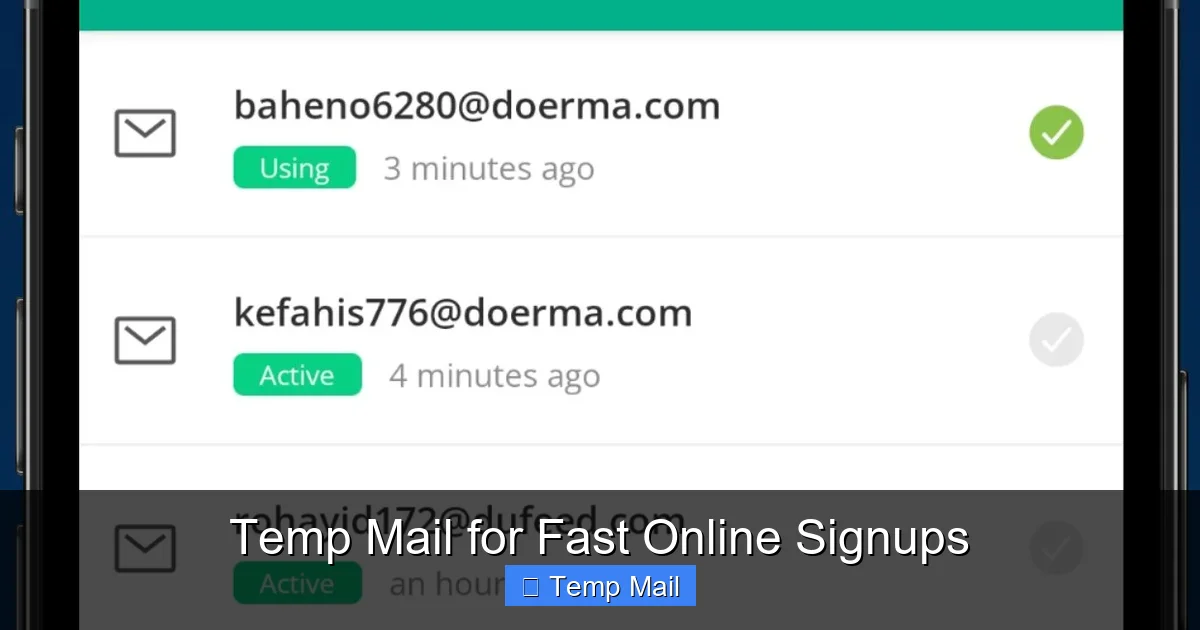
At its core, a temporary email service generates a unique email address for you on the spot, hosted on a public domain. You don’t create an account; you simply visit the temp mail website, and an inbox is created for you instantly. The address looks something like [email protected]. You copy that address, paste it into the signup form on the website you’re trying to access, and then switch back to the temp mail tab to view the incoming verification email. It’s that simple.
The Architecture of Ephemeral Inboxes
Unlike traditional email providers like Gmail or Outlook, temp mail services are built for transience. Their systems are not designed for long-term storage or complex organization. When you receive an email, it’s stored on their server for a predetermined, short lifespan. Once that timer expires—often 10 minutes to 48 hours—the email and the entire inbox are permanently purged from their systems. This architecture is intentionally minimalist to facilitate quick, one-off communications without the overhead of maintaining user data.
Disposable vs. Alias: Understanding the Nuance
It’s important to distinguish a true “temp mail” service from an “email alias” service. Services like SimpleLogin or Firefox Relay create aliases that forward mail to your primary inbox. You control the alias and can delete it later. True temp mail creates a standalone, anonymous inbox that exists independently and expires on its own. You never log into it with a password, and you cannot recover it once it’s gone. For the pure goal of a fast, no-strings-attached signup, the disposable temp mail model is the most streamlined.
How Temp Mail Works: A Step-by-Step Walkthrough
The process is beautifully simple, which is precisely why it’s so effective for speeding up online interactions. Let’s break down the typical workflow from start to finish.
Visual guide about Temp Mail for Fast Online Signups
Image source: image.winudf.com
Step 1: Generate Your Disposable Address
Navigate to a reputable temp mail website like Temp-Mail.org, 10MinuteMail.com, or Guerrilla Mail. The homepage will almost immediately display a randomly generated email address for you. Often, you can even click a button to generate a new one if you don’t like the first option. There is no “Sign Up” button. You are already “signed up.”
Step 2: Use It and Forget It
Copy the provided email address. Go to the website where you need to sign up—perhaps a beta testing platform for a new app, a site offering a downloadable whitepaper, or a forum with registration gated behind an email. Paste the temp mail address into the email field, fill out any other required information (often you can use fake but plausible details for name, etc.), and submit the form.
Step 3: Retrieve the Verification
Switch back to the temp mail browser tab. Within seconds, you should see the verification email appear in the inbox list. Click on it to open it, and then click the verification link or copy any code provided. This action completes your signup on the target website. You can now often close the temp mail tab entirely.
Step 4: Automatic Cleanup
You do nothing. The temp mail service’s countdown timer is running. After the set time (the service will usually display a countdown on the page), the inbox and all its contents are wiped clean. The email address is retired forever. If you need to sign up for something else later, you simply generate a new address. There is no cleanup required on your part.
The Undeniable Benefits: Why Speed and Privacy Win
Using a temporary email for signups isn’t just a trick; it’s a strategic choice with multiple tangible benefits that directly address common internet pain points.
Visual guide about Temp Mail for Fast Online Signups
Image source: d33v4339jhl8k0.cloudfront.net
1. Ultimate Spam Prevention
This is the most celebrated benefit. By using a temp mail, your primary email address—the one linked to your bank, your family, your real identity—never touches the website you’re signing up to. That website cannot add you to its marketing list because the address will cease to exist before the first promotional email even has a chance to be sent. You create a clean, impermeable firewall between your digital life and the commercial web’s constant solicitation.
2. Radical Time Savings
Consider the alternative. You sign up with your real email. You then have to log into your real inbox, find the verification email (often buried under a flood of existing mail), click the link, and then—this is the crucial part—you must *unsubscribe* from the website’s newsletter list manually, which is often a multi-step process designed to be difficult. With temp mail, the entire “signup, verify, and immediately unsubscribe” process is compressed into under 30 seconds. For someone signing up for multiple resources, this saves minutes per signup, which adds up to hours over time.
3. Zero Long-Term Commitment & Clutter
How many forgotten accounts do you have floating around the web? Each one is a potential liability and a source of notification noise. Temp mail ensures you have zero long-term commitment. There is no password to forget, no account to delete later, no settings to adjust. The inbox vanishes, and with it, the digital ghost of that signup disappears. Your online footprint becomes significantly leaner.
4. Enhanced Security & Anonymity
For activities where you want to explore a service without revealing your identity, temp mail is perfect. Whether you’re researching a competitor’s tool, signing up for a controversial forum to understand the discourse, or downloading software from a source you’re unsure about, using a temp mail adds a layer of anonymity. If that website suffers a data breach, your temp mail address—linked to nothing else—is what gets exposed, not your real identity.
Practical Use Cases: Where Temp Mail Shines Brightest
The theory is great, but seeing the practical applications helps solidify when and why to use temp mail. It’s not for everything, but for specific scenarios, it’s indispensable.
Visual guide about Temp Mail for Fast Online Signups
Image source: d33v4339jhl8k0.cloudfront.net
Accessing Gated Content & Free Downloads
This is the #1 use case. Bloggers, marketers, and companies often gate valuable content—e-books, research reports, template packs, stock photos—behind an email signup form. You want the content, but you don’t necessarily want to join their email list. A temp mail lets you bypass the gate instantly. You get the download link, the content is delivered, and the marketer gets a meaningless email address that bounces their next newsletter. It’s a clean transaction.
Testing Services & Free Trials
Want to try a SaaS tool’s premium features for 14 days without the sales team calling you? Use a temp mail for the trial signup. You can test the software’s functionality without entering your real email and getting locked into a sales nurture sequence. This is also useful for testing how a service handles email communications (do they send daily promos? weekly tips?) without cluttering your real inbox.
Forum & Community Registration
Many online forums, especially older or niche technical ones, require registration to post or access threads. You might want to ask a single question or contribute once. Using your primary email just adds another account to manage and another source of potential notification emails. A temp mail lets you participate anonymously and transiently, with no follow-up obligation.
App & Game Account Creation
Mobile apps and online games frequently push for account creation to save progress or access social features. Often, these accounts are low-value and tied to in-app advertising. Using a temp mail for these accounts keeps your main identity separate and prevents game-related promos from mixing with your important emails.
Bypassing Regional or Institutional Blocks
In some cases, a student or employee might need to access a resource that their school or company network blocks for their main domain. A temp mail from a different provider can sometimes be used to create a new, unblocked account for accessing a public resource, though this is a more nuanced and less common application.
The Other Side of the Coin: Risks and Limitations
No tool is perfect, and temp mail has clear drawbacks and risks that every user must understand to employ it wisely and avoid pitfalls.
Not for Important or Recoverable Accounts
This is the golden rule. Never, ever use a temp mail for any account where you would need to recover your password, receive security alerts, or prove your identity over time. This includes: your primary email password recovery, banking and financial services, primary social media profiles, government services, healthcare portals, or any subscription service you intend to keep long-term. If the temp mail inbox expires, you lose all access to that account forever.
The “Blocked Domain” Problem
Many websites, especially those dealing with finance, health, or high-value transactions, are aware of temp mail services. They maintain lists of known disposable email domains and will outright block them during signup. If you try to use @tempmail.demo on such a site, you’ll get an immediate error message: “Please enter a valid email address.” In these cases, you have no choice but to use a real email. This is a security feature for them, not a bug.
Lack of Features and Support
Don’t expect a full-featured email client. Most temp mail services offer a bare-bones web interface. You typically cannot send emails (only receive), there is often no support for file attachments beyond small sizes, and there are no folders, filters, or search functions. The inbox is a simple, chronological list that deletes itself. If you need to forward an email or organize it, you’re out of luck.
Potential for Abuse and Blacklisting
Because temp mail addresses are public and anonymous, they are sometimes used for malicious purposes like signing up for spam services, creating fake accounts for abuse, or bypassing bans. This can lead to entire temp mail domains being blacklisted by major email providers. Occasionally, a verification email you’re expecting might not arrive because the temp mail provider’s domain has been blocked by the sender’s server. Using a less popular or newer temp service can sometimes mitigate this.
Best Practices: How to Use Temp Mail Safely & Effectively
Armed with knowledge of the pros and cons, you can adopt a smart strategy. Think of temp mail as a specialized tool in your digital toolkit, to be used for specific jobs.
Choose a Reputable Service
Not all temp mail providers are created equal. Stick with well-known, established services that have a clear privacy policy (even if short) and a track record. Avoid obscure sites with lots of ads or that ask for any personal information. Good options generally have a simple interface, clear countdown timers, and don’t require you to solve endless CAPTCHAs. Do a quick search for “best temp mail 2024” to see current community recommendations.
Use a Different Address for Different Purposes
Don’t reuse the same temp mail address for multiple signups across different sites. While it doesn’t matter if one site “sees” the same temp address as another, generating a fresh address for each significant signup maximizes privacy and makes it impossible to cross-reference your anonymous activity. Most services make this a one-click operation.
Know the Expiration Timer
Before you start a signup, glance at the countdown timer on your temp mail tab. If you’re signing up for a service that might take more than an hour to send a verification email (some manual review processes), choose a service with a longer lifespan (like 24 or 48 hours) or be prepared to generate a new address and restart the process if the inbox expires first.
Never Use for Account Recovery
Repeating this for emphasis: the moment you use a temp mail for a signup, you must treat that account as potentially disposable. If you forget your password a week later, you will not be able to recover it. For any service you value, use your primary email from the start. The rule of thumb: if you’d be upset losing access to it, don’t use temp mail.
Combine with a Password Manager
If you’re using a temp mail for a trial you want to use for a week, create a unique, strong password for that account and store it in your password manager (like Bitwarden, 1Password, etc.). That way, you can log in directly without needing email-based password resets, which would fail once the temp mail expires. This extends the usability of the temporary account for its intended short lifespan.
The Future of Ephemeral Communication
As privacy concerns grow and the digital noise increases, the appeal of temporary tools will only rise. We see this trend with disappearing messages in chat apps and incognito browsing modes. Temp mail is part of this “ephemeral identity” movement. While it won’t replace your primary email, it carves out a crucial niche for frictionless, private interaction with the commercial web. Expect to see more integration, perhaps with browser extensions that auto-fill temp mail addresses on known signup pages, or with privacy-focused browsers offering built-in disposable email generators. The goal remains the same: empowering you to engage with the internet on your terms, without handing over your digital address at every turn.
Conclusion: Your Inbox, Your Rules
The next time you’re faced with an email signup form, pause. Ask yourself: “Is this a relationship I want to maintain, or a transaction I want to complete?” If it’s the latter, reach for a temp mail. It’s the ultimate tool for taking back control of your primary inbox from the relentless tide of promotional emails. It slashes the time spent on signups, provides a robust shield against spam, and keeps your long-term digital identity cleaner. By understanding its purpose, respecting its limitations, and following best practices, you can harness the power of the disposable inbox to navigate the web faster, safer, and with far less digital baggage. Try it on your next free download or forum registration—you’ll wonder how you ever signed up without it.
Frequently Asked Questions
Is using temp mail legal?
Yes, using a temporary email service is completely legal. It is simply a tool for receiving email anonymously for a short period. The legality depends on how you use it; using it for fraud, illegal activities, or to bypass terms of service agreements is illegal, not the tool itself.
Is temp mail safe and private?
For basic signups, it is generally safe and enhances privacy by keeping your real email hidden. However, the inbox is not encrypted or password-protected, so anyone with the URL could theoretically access it while it exists. Never use it for sensitive communications or accounts containing personal/financial data.
How long do temp mail addresses and emails last?
It varies by provider. Common expiration times are 10 minutes, 1 hour, 1 day, or even 7 days. The countdown is always displayed on the service’s page. After expiration, the address and all emails are permanently deleted and cannot be recovered.
What’s the difference between temp mail and a regular email account?
The core difference is permanence and control. A regular email (Gmail, Outlook) is yours indefinitely, with a password, full features, and used for identity verification. Temp mail is anonymous, has no password, is feature-poor, and expires automatically. You cannot send from it and cannot recover it.
What should I do if a website blocks my temp mail address?
If a site rejects the temp mail domain, it means they maintain a blacklist of disposable email providers. Your only option is to use a different, real email address. This is a security measure on their part, and there is no workaround that respects their terms of service.
Can I use temp mail on my phone?
Absolutely. Temp mail services are websites, so they work perfectly in any mobile browser. Some providers also offer dedicated mobile apps for convenience. The process is identical: generate an address in the browser/app, copy/paste it into the signup form, and switch back to check for the email.
Leave a Reply