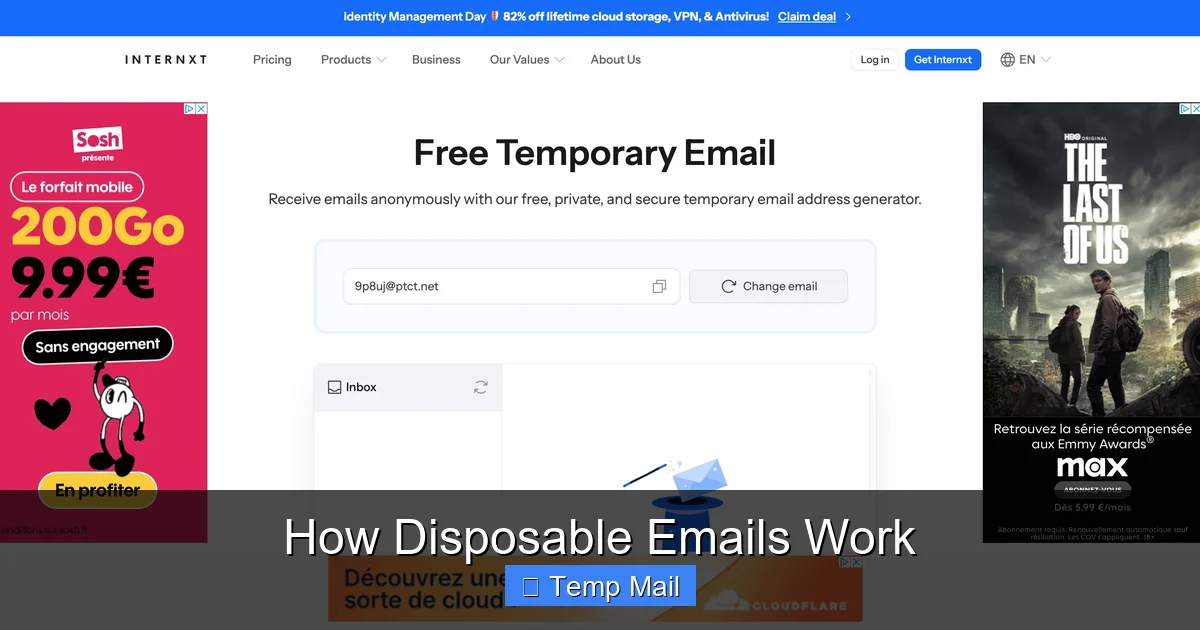
Disposable emails are temporary, self-destructing email addresses created instantly via web-based services. They work by generating a random inbox on a shared domain that automatically deletes messages after a short time (usually 10 minutes to 1 hour). This allows you to sign up for websites, download files, or access content without revealing your primary email, effectively shielding your real identity and inbox from spam, data breaches, and unwanted marketing.
Ever felt that pang of hesitation when a website asks for your email address? You want the free ebook, the discount code, or to read that article, but handing over your primary email feels like opening your front door to a stranger who might never leave. This is the modern internet’s classic trade-off: convenience versus privacy. Enter the clever solution of disposable email, also known as temp mail or throwaway email. But how does this digital magic trick actually work? Let’s pull back the curtain and explore the fascinating, simple technology that lets you browse with a cloak of anonymity.
At its heart, a disposable email service is a public, automated inbox generator. It’s not a traditional email system you log into with a password you set. Instead, it’s a massive, shared pool of pre-generated or instantly created email addresses that anyone can use, for a very short time. The genius is in its utter disposability. There’s no “you” attached to the address. No recovery options. No long-term storage. It exists solely to receive a single verification link or a small file and then vanish into the digital ether, taking any potential spam with it. Understanding this mechanism empowers you to use the web more freely and securely.
Key Takeaways
- Core Function: Disposable emails provide a temporary, anonymous inbox that auto-deletes messages after a set period, requiring no registration or personal details.
- Privacy Shield: They act as a protective buffer, preventing websites from collecting your primary email address and linking it to your identity or browsing habits.
- Spam Combat Tool: By using a disposable address for low-trust sign-ups, you ensure any resulting spam is sent to a burner address that vanishes, keeping your main inbox clean.
- No Long-Term Storage: Messages are stored on the provider’s server only briefly; once the timer expires or the browser tab closes, the inbox and its contents are permanently erased.
- One-Way Communication: These addresses are typically for receiving only; you usually cannot send emails from a disposable address, limiting their use to verification and receipt.
- Use Case Specific: Ideal for one-time downloads, forum registrations, or accessing gated content, but never for critical accounts like banking, primary social media, or work.
- Provider Variance: Features like lifespan, domain choice, and attachment support differ between services; always check a provider’s specific policy before use.
📑 Table of Contents
- What Exactly Is a Disposable Email Address?
- The Technical Dance: How Disposable Emails Actually Function
- Common and Clever Use Cases: When to Reach for Temp Mail
- The Flip Side: Limitations and Risks of Disposable Emails
- Choosing a Disposable Email Service: What to Look For
- Best Practices for Safe and Effective Use
- Conclusion: A Powerful Tool for the Privacy-Conscious User
What Exactly Is a Disposable Email Address?
Before diving into the mechanics, let’s define our subject. A disposable email address is a temporary, single-use (or short-use) email alias. It’s designed to be used once or twice and then abandoned. Unlike your permanent Gmail, Outlook, or Yahoo address, which is tied to your identity, a disposable address is anonymous and ephemeral.
The Philosophy of Burner Accounts
The concept mirrors a “burner phone”—a cheap, prepaid mobile phone used briefly and discarded. In the digital realm, your primary email is your master key. It’s linked to password resets for dozens of sites, your social media, your bank, your work, and your personal contacts. If that key is compromised in a data breach or sold to marketers, the fallout can be years of spam and potential security risks. A disposable email is a decoy key. You use it for locks you don’t care about long-term—like a free trial at a sketchy site or a forum you’ll visit once. When the decoy is “burned” (deleted), the master key remains safe and untouched.
Key Characteristics at a Glance
What makes an email address “disposable”? Here are its defining traits:
- No Registration Required: You do not create an account. You simply visit a website, and an address is generated for you.
- Automatic Deletion: Messages and the inbox itself are automatically purged after a predetermined time, often between 10 minutes and 1 hour, though some offer 24 hours.
- Anonymous Generation: No personal information is collected. The address is a random string of characters (e.g., [email protected]).
- Publicly Accessible: Anyone with the exact address can view the inbox. This is why you must use a unique, random address each time.
- Receiving Only: The vast majority of services do not allow you to send emails from the disposable address. It’s a one-way pipe for incoming messages.
The Technical Dance: How Disposable Emails Actually Function
Now for the engine room. The process is surprisingly straightforward and relies on clever server-side scripting and shared resources. Let’s walk through a typical user journey.
Visual guide about How Disposable Emails Work
Image source: funkyspacemonkey.com
Step 1: You Arrive and an Address is Born
You navigate to a service like Temp-Mail.org, 10MinuteMail.com, or Guerrilla Mail. The moment the page loads, the backend server springs into action. It generates a completely random email address. This isn’t done by creating a full user account in a database. Instead, it often creates a temporary, unique identifier (a long random string) and pairs it with the service’s domain (e.g., @guerrillamail.com). This pairing becomes your inbox’s “name.” The server then dynamically creates a folder or database entry labeled with that random string to store incoming mail. All of this happens in milliseconds.
Step 2: You Use the Address Somewhere
You copy the generated address (e.g., [email protected]) and paste it into a website’s sign-up form. You request a verification email. The website’s server sends an email to that exact address, just like any normal email. The message travels through the standard internet SMTP (Simple Mail Transfer Protocol) pathways until it lands at the disposable email provider’s server.
Step 3: The Provider Receives and Displays
The disposable mail service’s server, always listening on port 25 for SMTP traffic, receives the incoming message. It looks at the recipient address ([email protected]), extracts the unique random string (“x8f3p9”), and finds the corresponding temporary storage folder. It deposits the email there. Meanwhile, on your browser tab open to the disposable email site, a JavaScript or AJAX script is polling the server every few seconds, asking, “Do I have any new mail for inbox x8f3p9?” When the server says “yes,” the message’s subject, sender, and body (or a link to view it) appear in your browser window instantly.
Step 4: The Inevitable Self-Destruct
This is the critical step. Two main timers are running in the background:
- Inactivity Timer: If you close the browser tab or navigate away, the server starts a countdown (e.g., 1 hour). No interaction means the inbox is marked for deletion.
- Absolute Lifespan Timer: From the moment of creation, the inbox has a hard expiry (e.g., 24 hours). It will be deleted at this time regardless of activity.
When either timer hits zero, the server executes a cleanup script. It permanently deletes the random string’s folder and all emails within it from its storage system. The address is then recycled—the random string might be reused much later for a completely different, anonymous user. There is no archive, no “trash” folder, and no way to recover it. Poof. Gone.
Common and Clever Use Cases: When to Reach for Temp Mail
Knowing *how* it works is one thing; knowing *when* to use it is the real skill. Disposable emails shine in specific scenarios where the risk of spam or data collection outweighs the need for a permanent, secure channel.

Visual guide about How Disposable Emails Work
Image source: funkyspacemonkey.com
Gated Content and One-Time Downloads
This is the most popular use case. You want a whitepaper, a research report, a template, or a discount coupon. The site says “Enter your email to download.” Using your primary email here is a high-risk move. You’ll likely get added to a marketing list you never asked for, and that one download could lead to a weekly newsletter for years. A disposable email lets you grab the file, get the verification link, and then let the address die, leaving no trace.
Signing Up for “Sketchy” or Low-Trust Services
You’re trying a new, unknown app or forum. It requires registration. Is it legitimate? Maybe. Maybe not. Using a disposable address is a perfect low-stakes test. If the service turns out great, you can later upgrade to a real email. If it’s spammy or worse, you’ve given it a dead-end address. It’s a digital “test drive” without commitment.
Avoiding Spam from Data Breaches
Data breaches are a matter of “when,” not “if.” When a company you signed up with (using your primary email) has a breach, your email is now in the hands of spammers and potentially hackers. If you had used a disposable address for that site, the breached data is useless—the email address no longer exists. It’s a brilliant way to compartmentalize your digital footprint and limit the “blast radius” of any single breach.
Bypassing Regional Restrictions for Content
Some websites block content based on your IP or require a local email to sign up. While a VPN handles the IP, a disposable email from a provider with a relevant domain (e.g., a .de domain for German content) can sometimes help bypass simple email-based regional gates for accessing public information.
Developing and Testing
For software developers testing user registration flows, disposable email services are invaluable. They can automate tests by generating a new inbox, triggering a sign-up email, and then programmatically checking if the email arrived—all without managing a single real email account.
The Flip Side: Limitations and Risks of Disposable Emails
Disposable email isn’t a silver bullet. It’s a tool with specific applications and significant drawbacks if misused. Understanding its limitations is crucial for safe and effective use.

Visual guide about How Disposable Emails Work
Image source: mailtemp.uk
They Are Not for Important Accounts
This is the cardinal rule. Never, ever use a disposable email for:
- Financial accounts (banking, PayPal, stock trading)
- Primary social media profiles (Facebook, Twitter, Instagram)
- Cloud storage or password managers (Dropbox, LastPass)
- Any account where recovery is vital. If you forget your password and the reset email goes to an address that expired 30 minutes ago, you are permanently locked out.
Security and Privacy Caveats
While they protect *your* email, the disposable inbox itself is not private. The service provider can see all emails that pass through your temporary inbox. Most reputable services claim not to log or sell this data, but you are trusting a third party with whatever content is in those verification emails. Furthermore, because the inbox is publicly accessible via the URL, anyone who guesses or discovers your random address could read your mail. The randomness is your only guard.
Reputation and Blocking
Many websites and online services are wise to disposable email domains. They maintain lists of known temp mail providers and will block sign-ups from those domains outright. If you try to use @mailinator.com on a serious platform, it will likely be rejected. This is a good thing—it tells you the site is serious about user accountability—but it means disposable emails won’t work everywhere.
No Sending Capability
You are a receiver only. You cannot use a disposable address to send an email to a friend, a colleague, or a customer. This confines its use strictly to receiving verification codes, links, and small files.
Choosing a Disposable Email Service: What to Look For
Not all temp mail services are created equal. When selecting one, consider these factors based on your needs.
Inbox Lifespan
How long does the inbox last? 10 minutes? 1 hour? 24 hours? For a quick verification code, 10 minutes is fine. If you need to download a large file or might step away from your computer, a 1-hour or 24-hour service (like Temp-Mail.org’s extended mode) is better. Be aware: longer lifespans mean the address is potentially accessible to others for longer.
Domain Variety
Some services offer multiple domains (e.g., @trashmail.com, @dispostable.com). If a particular domain is blocked on a site you’re trying to register for, you can try generating an address from a different domain on the same service.
Attachment Support
Can the service receive emails with attachments? Many do, but there are often size limits (e.g., 10MB, 25MB). If you’re expecting a PDF or image, check this. Some simpler services strip attachments entirely.
User Interface and Features
Some interfaces are clean and simple. Others offer features like:
- Reply Functionality: Rare, but some allow you to reply to the received email from the disposable interface.
- Custom Username: The ability to choose the first part of the address (e.g., myname123@…), though this reduces anonymity.
- Browser Extensions: Some providers offer Chrome/Firefox extensions for one-click generation.
- API Access: For developers to integrate into testing workflows.
Reputation and Reliability
Stick with well-known, established providers. A service that goes offline frequently or deletes mail instantly is useless. Read recent user reviews. Check if they have a clear privacy policy stating they do not log or sell email contents.
Best Practices for Safe and Effective Use
To master the art of the disposable email, follow these guidelines. They’ll save you headaches and maximize your privacy.
1. Never Use for Critical Services
This cannot be stressed enough. Your bank, your main cloud storage, your primary social media—these are the keys to your digital life. They require a permanent, secure, recovery-capable email. Use a disposable email here, and you risk permanent, catastrophic loss of access.
2. Treat Each Address as a Single-Use Token
Don’t reuse the same disposable address across multiple unrelated sites. If Site A sells your address to a spammer, and you used that same disposable address for Site B (which you actually like), the spam will still flow into that shared inbox until it self-destructs. Generate a fresh address for every new sign-up to perfectly isolate each service.
3. Check the Attachment Policy First
Before clicking “download” on a gated file, ensure the service you’re using can handle the file type and size. There’s nothing worse than waiting for a download, only to find the attachment was stripped by the email provider.
4. Be Aware of the Public Nature
Do not use disposable email for anything remotely sensitive. Do not send personal details, passwords, or confidential information *to* a disposable address, and assume any “verification” email you receive could be read by anyone who stumbles upon the same random inbox later. It’s for low-stakes, one-way communication only.
5. Have a Permanent Backup Plan
If you’re signing up for a service you *might* want to keep long-term, use your real email from the start. It’s easier than trying to migrate your account later, which often isn’t possible without contacting customer support (who you can’t contact without a valid email!).
6. Use a Password Manager’s Alias Feature (A Premium Alternative)
Services like FastMail, ProtonMail, and Apple’s Hide My Email offer a more robust alternative. They create unique, forwardable aliases that *do* deliver to your real inbox. You can delete the alias at any time, stopping all future emails. This offers better control and privacy than a public disposable inbox, as only you receive the mail. Consider this for services you want to try but might keep.
Conclusion: A Powerful Tool for the Privacy-Conscious User
Disposable email services work through a brilliant blend of simplicity and automation: generate a random inbox, let it receive a message, and then automatically incinerate it without a trace. It’s a low-tech, high-impact tool for reclaiming control in an ecosystem that often treats your email address as a commodity. By understanding its inner workings—the shared server resources, the polling mechanism, the strict timers—you can wield it effectively.
Use it wisely for its intended purpose: as a shield against the spam and data-harvesting that plagues the modern web. Let it be your first line of defense when you encounter an email gate for a free resource or a dubious sign-up form. But remember its limits. It is not a substitute for a secure, primary email on matters of importance. When used with this clear understanding, disposable email becomes more than just a temp mail trick; it becomes a fundamental part of a smart, privacy-first digital hygiene routine, allowing you to explore the web with a little less baggage and a lot more peace of mind.
Frequently Asked Questions
Is using a disposable email legal?
Yes, using a disposable email address is completely legal. These are legitimate services provided by companies. However, using them to commit fraud, evade bans, or send malicious content is illegal, as the activity itself is the crime, not the tool used.
Can websites detect I’m using a disposable email?
Yes, many can and do. They maintain lists of domains from known disposable email providers. If you try to sign up with an address from one of these domains, the website’s system will often reject it outright. This is a common anti-spam and anti-abuse measure.
How long do disposable emails typically last?
It varies by provider, but most disposable inboxes last between 10 minutes and 1 hour from creation or last use. Some premium services offer 24-hour or even longer lifespans. Always check the specific timer displayed on the service you are using.
Are disposable emails safe from hackers?
They are safe in one key way: if the service is breached, your specific random inbox is likely already expired and deleted, limiting exposure. However, the inbox itself is not private while it exists—anyone with the exact URL could access it. They are not safe for receiving sensitive information like password resets for important accounts.
What happens to my emails after the disposable address expires?
They are permanently and irreversibly deleted from the provider’s servers. The inbox is destroyed, the random address is recycled for future users, and there is no way to recover the messages. This is the core “disposable” feature.
Can I send emails from a disposable address?
Almost never. Disposable email services are designed almost exclusively for receiving messages, such as verification codes. The ability to send outgoing mail is extremely rare and would typically defeat the purpose of anonymity and prevent abuse of the service.
Leave a Reply